

ADMINISTRATIVE
- Joined
- Nov 1, 2020
- Messages
- 1,338
- Reaction score
- 668
- Points
- 113
- iCoin
- 16,434 K
- Thread starter
- Administrator
- Moderator
- #1

Description:
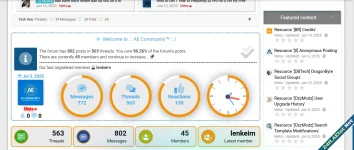
Add 4 blocks of parallel information blocks to any area of your forum without using any plugins.
Design Style 1:

Open the template PAGE_CONTAINER your theme and look for the following code:
Copy and paste the codes provided below. Don't forget to edit the relevant fields as you like:
Then paste the code I provided below into your theme's extra.less template and save it. That's all.
Design Style 2:

Open the template PAGE_CONTAINER your theme and look for the following code:
Copy and paste the codes provided below. Don't forget to edit the relevant fields as you like:
Then paste the code I provided below into your theme's extra.less template and save it. That's all.
Add 4 blocks of parallel information blocks to any area of your forum without using any plugins.
Design Style 1:
Open the template PAGE_CONTAINER your theme and look for the following code:
Code:
You must log in to view
(3 lines)
Code:
You must log in to view
(30 lines)
Code:
You must log in to view
(195 lines)Open the template PAGE_CONTAINER your theme and look for the following code:
Code:
You must log in to view
(3 lines)
Code:
You must log in to view
(30 lines)
Code:
You must log in to view
(195 lines)
Last edited:

![[XB] XFRM: Purchasable Resources](/data/resource_icons/0/589.jpg?1760024912)


![[BR] Credits](/data/resource_icons/0/396.jpg?1749898335)
![[tl] Anonymous Posting](/data/resource_icons/0/380.jpg?1749147103)